PDFs, logs & other files
Get started
GitHub
Attach PDFs, logs, and other files to a PR
From the command line or an agent, without drag-and-drop.
Why not drag-and-drop #
GitHub’s web editor takes many file types, but only by drag-and-drop or a file picker. A script, a CI job, or a coding agent can’t use either.
The uploads CLI hosts any accepted file at a stable URL and links it from the pull request. With it you can:
- Attach a test report, a coverage summary, or a build log to a PR.
- Attach files before the PR exists, and have them posted when it opens.
- Replace a file on a later run and keep the same URL.
Attach a file #
Pass the file and the pull request number:
uploads put ./report.pdf --pr 123That uploads the file and adds it to the PR’s attachments comment. Images and video show inline. Other files are listed in a table with their type and size:
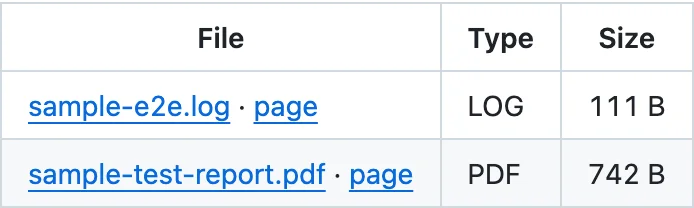
Use --issue to attach to an issue instead.
No PR yet? Run uploads put on the branch without –pr —
see Stage before a PR exists →.
Accepted file types #
- Documents: PDF.
- Archives: zip and gzip.
- Text: plain text, Markdown, CSV, JSON, and logs.
- Media: images (PNG, JPEG, GIF, WebP, AVIF) and video (MP4, WebM, MOV).
HTML is not accepted. Size limits depend on your plan. See Plans & limits.
Uploaded files are public to anyone with the URL. Remove secrets, tokens, and personal data from logs, JSON, and reports before you upload them.
Agents without a shell #
An agent with no local shell, such as a cloud agent, can upload through the hosted MCP server at
https://agents.uploads.sh/mcp. See Set up your agent.
FAQ #
- Can I attach a PDF or a log file to a GitHub PR without the web editor?
- Yes. Run uploads put with the file and --pr and the PR number. It works from a terminal, a CI job, or a coding agent.
- How do I attach a test report to a pull request from CI or an agent?
- Run uploads put with the file and --pr and the PR number. The file gets a stable URL, and a link to it appears in the PR's attachments comment.
- Are uploaded files private?
- No. Uploaded files are public to anyone with the URL, including files attached to private repositories. Remove secrets and personal data from logs, JSON, and reports before you upload them.